
Introduction
Welcome to the Braiins University online learning book. You can select a chapter from the sidebar. This book is written in Markdown with the mdBook documentation tool and its source is hosted at https://github.com/luciusmagn/braiins-university.
Organization
The Rust education project is organized into several topics, which are comprised of theoretical introduction with runnable code examples, links to further materials, and description of a task to program, which is a Rust project.
TIP: To run code examples, click
the ▶️ button to see output appear underneath the code snippet.
Clicking the copy icon let's you easily transfer the code to a Rust Playground
which allows you to modify it and experiment. Just using Ctrl-C is usually not
enough, as many examples contain hidden code to reduce clutter and ensure only the
important part of the snippet is emphasized. Some code examples might also be
editable.
Chapter dependency graph
This graph should help you orient yourself how to begin and how to proceed:
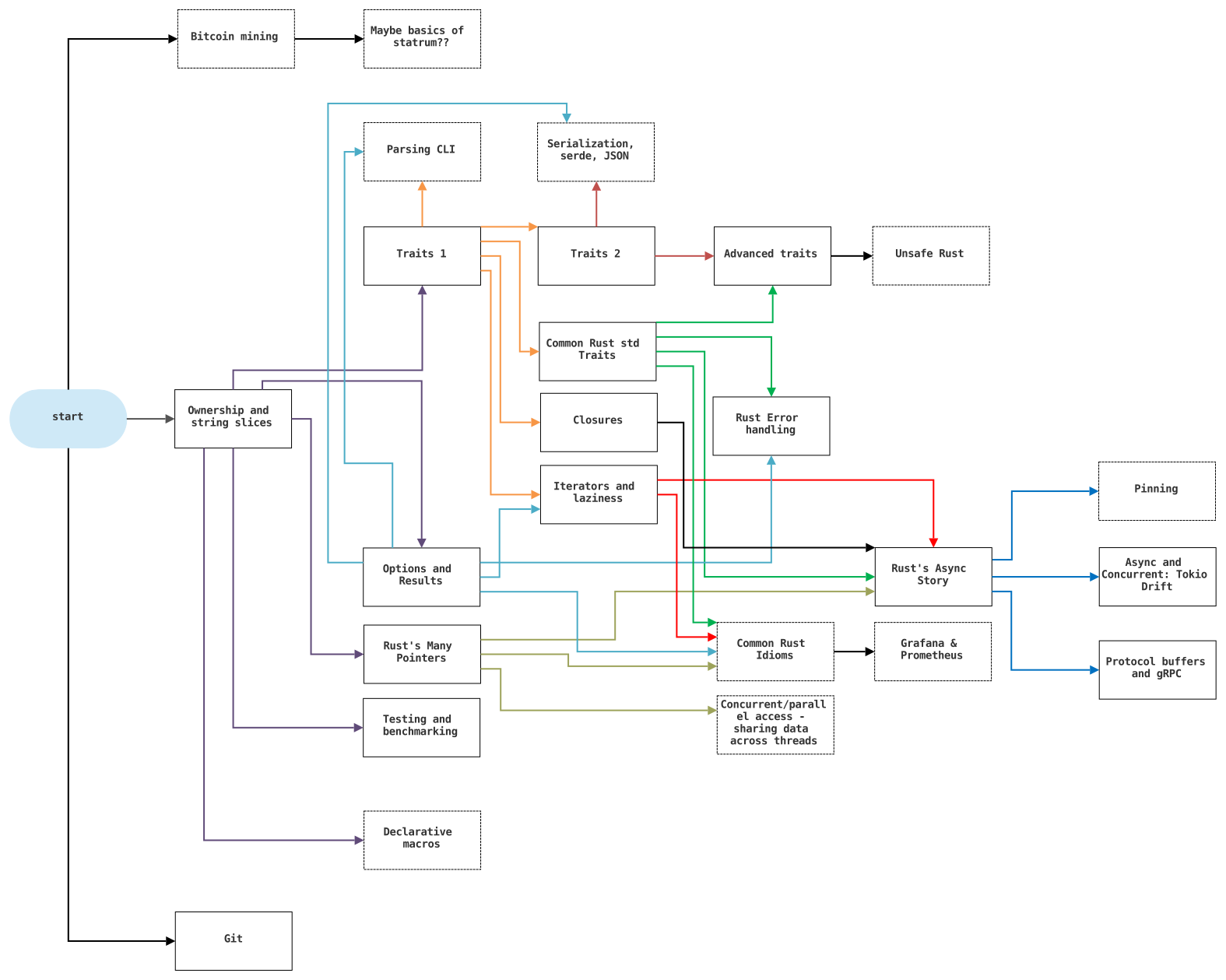
Click on the image to see it enlarged.
Projects
All chapters contain a practical part in the form of a project targeting what you just learned. Applying theory in practice is a key component of education, and especially important in the context of Rust, as it is quite different from most of the mainstream programming languages. The projects generally follow Braiins code guidelines and should be organized properly and versioned with git.
Having an environment for Rust development in your device is a strong requirement, as the Rust Playground can only get you so far, and some projects may require you to import crates that are not available on the playground. Please check out the following list of links to help you get a working setup:
- rustup (installation tool): https://rustup.rs/
- Are We (I)DE Yet? (overview of editor support and what plugins/extensions are required if any): https://areweideyet.com/
- Rust toolchain component overview (to get you familiarized with the programs you might be using): https://rust-lang.github.io/rustup/concepts/components.html
TIP: Prefer rust-analyzer over RLS where possible. Plugins that use
this (still not default) implementation of LSP have much better performance, completion and goto features than the
old RLS ones. This is particularly notable in the case of Visual Studio Code, where you really want install
this extension https://marketplace.visualstudio.com/items?itemName=matklad.rust-analyzer.
Workshops
This page also contains accompanying text versions of Braiins Rust workshops. These will be mostly accompanied by work on a repository, which will be linked in every chapter. You can find available workshops in the sidebar, beneath the project chapters. Feel free to message me with questions, suggestions and complaints regarding a/the workshop(s).
Resources
We provide links to recommended text, video and community resources, please check out:
- Concept Prerequisites
- General Rust Pathway
- Reference Bits from the sidebar
In the context of Braiins, check out the following streams on Zulip:
- #Rust Learning
- #Development>Rust
- You can also message me directly
Errata
Send mistakes or typos to Lukáš Hozda or create an issue/MR on the repository.